 tratto
History & the graph
The Git module opens on the history of the repository in the current tab: one row per commit, with the branch graph beside the message. tratto asks Git for the history through its own core, a separate program, so a long history stays responsive.
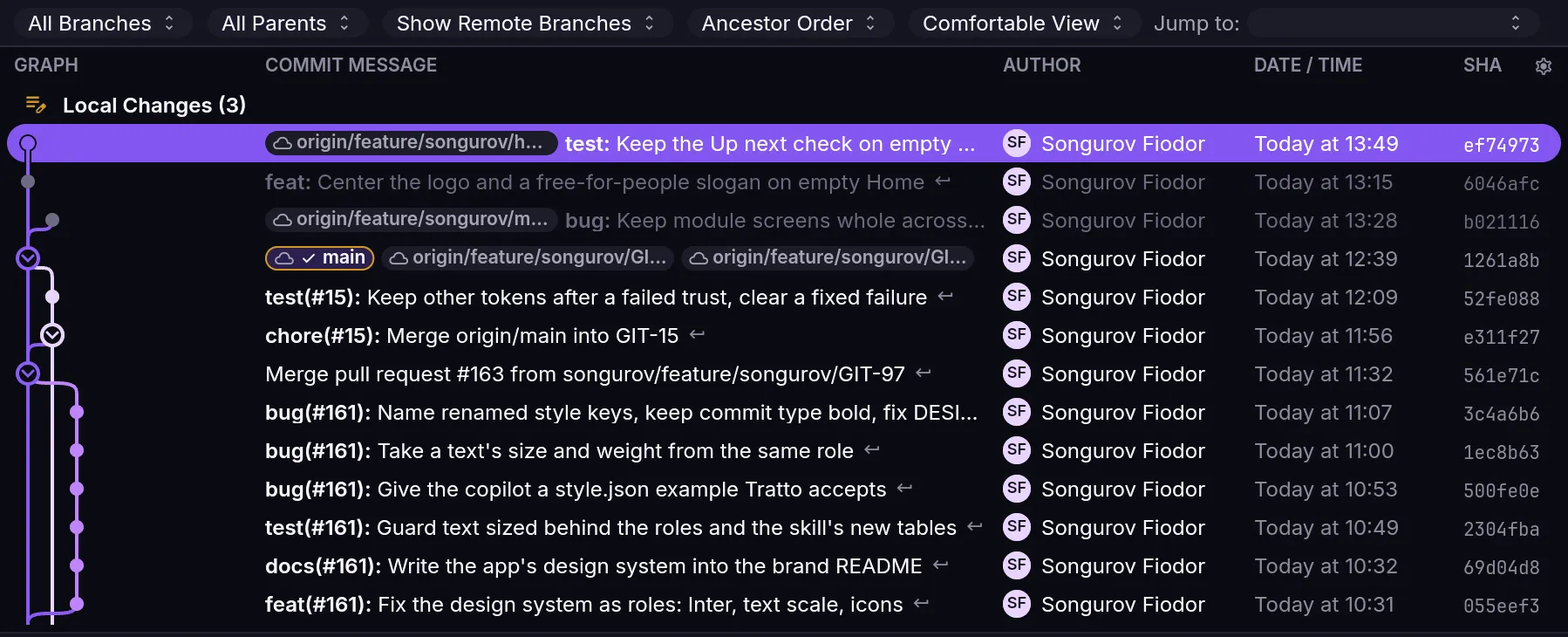
Reading the graph
Each commit sits on a lane of the graph, and merges are drawn where the lanes meet.
- Commits that exist only on a remote are dimmed, row and graph node.
- Commits you have not pushed yet get a tinted message and an "ahead" mark.
- A merge can be folded. Click the graph node of a merge to fold or unfold the side it brought in.
View › Close or Open the Graph hides the graph column and brings it back.
Filtering what you see
The filter bar above the list sets the scope of the history:
- All, HEAD, one branch, or Smart. Smart shows HEAD, its upstream, the branch it is based on and the local branches that track that base. View › Smart Branch Visibility turns it on and off.
- First parent only, remote branches on or off, order by date or topology, and the row density.
- Jump to moves to a branch or tag.
Searching for a commit
The Commit… field of the filter bar finds a commit by its id or by words in its message.
Columns
The columns are refs, graph, message, author, date and SHA. Right-click the header to move, resize, show or hide a column, switch to the compact graph or turn Smart on. View › Reset Columns to Default Layout and Reset Columns to Compact Layout bring back one of the two presets; Compact hides author, date and SHA.
The layout itself is a data file, history_columns.json: see UI as data.
Not built yet
Some View menu items are greyed out because they are not built yet: Collapse All Merges, Show HEAD, Hide Tags, Hide Stashes, Lost Commits, Filter by Active Branch, Uncommitted Changes and All Commits. Until then, fold merges one at a time from the graph, and use the HEAD or branch scope of the filter bar.